
Did you become a “Suspicious Adventurer” in 《MapleStar》 for no apparent reason? This guide explains common causes of mistaken flags, such as failing an outdoor bot check or being affected by contraband, and shows how to appeal to official support. Warning: do not exploit the rumored “Hainus Bug” to clear the flag, or your account could face a permanent ban. Learn how to avoid problems while away from the game and keep your account safe.

Recently, many players in “MapleStory Worlds” have complained about being inexplicably labeled “Suspicious Adventurers,” severely affecting gameplay. The status restricts movement and may make them appear to be part of a botting operation.
Why do players become suspicious adventurers, how can an incorrect lock be removed, and what is the recently viral “Hae-Rydus bug unlock method”? This article gathers the most complete methods and prevention tips in one place!
Why did I become a “Suspicious Adventurer”? 3 common causes explained
Before looking for a way to unlock it, let us first understand MapleStar’s anti-idle system. Players are usually classified as “Suspicious Adventurers” in the following situations:
1. AFK farming in the field triggers the “Lie Detector”
Many players leave their characters idling on outdoor maps. But if a character is on a monster-filled outdoor map, another player or the system may send a “lie detector.” If you do not respond in time while away from your seat (AFK), repeated failures can lead the system to flag you as a bot and mark your adventurer as suspicious.
2. the “zombie virus” contagion mechanic (buying illicit goods)
According to player reports, the “suspicious” tag in MapleStar can spread. If you buy an item at the auction house or in a private trade that was produced by an adventurer already marked as suspicious, the abnormal status can spread to you like a zombie virus, leaving you unfairly affected.
3. system misclassification
Some players say they received the “Suspicious Adventurer” status even while idling in a village or following every game rule. This is usually attributed to a false positive from an overly sensitive security system.
How can I remove the Suspicious Adventurer status?2 Methods for removing the status
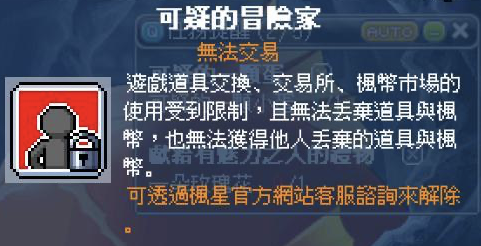
Two ways of removing the “Suspicious Adventurer” status are currently circulating in communities and forums: one is the official channel, while the other is a system exploit that has recently sparked heated discussion.
Method One: Appeal through official customer support (the only legitimate and safe method)
If you are certain you play entirely by hand and have beenIncorrect system lock, the only correct solution is to “visit the MapleStar official website and appeal to customer service.”
- Steps: Go to the official customer support center ➔ Select “Account Issue Appeal” ➔ Describe in detail what you were doing before the lock (for example, idling in a village or just buying an item from the auction house).➔ Submit the form and wait for review.
- Unlock time: According to player reports on forums, customer-service review of a mistaken lock takes about 1 to 2 weeksor more; please wait patiently.
Method Two: Use the “Hekaton bug” to remove the status
Recently, botting operations and players discovered a game bug that can forcibly remove the suspicious status. It works by exploiting a specific skill of the field BOSS “Hekaton”:
- In combat, Hae-Rydus casts a “Skill Removal” debuff.
- If you die at the moment Hainus casts Dispel, you turn into a “tombstone.”
- The system’s skill-removal check also clears the “Suspicious Adventurer” status, so Hae-Rydus has been nicknamed the “memory eraser” by players.
⚠️ [Strong warning: Do not try this]
We strongly condemn this and advise players not to use this bug to unlock anything! Exploiting a game vulnerability to evade penalties is a serious violation of the game's rules. If detected by the official team, it could lead to a permanent account ban. Please protect your account and appeal through official channels; do not risk losing it for a minor gain!
How to avoid becoming a suspicious adventurer: A player self-protection guide
Before the official team fixes mistaken-lock issues and the contagion problem, regular players can protect their accounts by following these tips:
- Change your idle-play habits: Never AFK in field maps! If you need to step away or idle, return to a “town”orUse safe areas such as “Ardentmill” to greatly reduce the chance of triggering the Lie Detector.
- Trade carefully: Avoid buying cheap items or game currency from unknown sources, as buying “illicit goods” from botting operations could spread the problem and get you wrongly labeled as suspicious.
- Watch for anti-bot verification prompts: If you need to step away briefly while fighting monsters—for example, to collect a delivery or use the restroom—move your character to a safe place first to avoid failing the anti-bot verification within a few minutes.
Summary
《MapleStory WorldsWhile the “Suspicious Adventurer” system in ”MapleStar” is intended to combat botting operations, it has also caused difficulties for many players who play manually. If your account is mistakenly locked,Be sure to appeal through official customer-service channels, and do not rush to try using “Hekaton” Bug” and other workarounds, which could lead to the permanent loss of your account!