
Can’t connect because 2025 Taiwan Xiaohongshu is blocked? The Ministry of the Interior’s anti-fraud measures led to the block, and this article gives the latest unblocking guide. Get around the restriction in 2 steps without installing an app: learn to change DNS settings on iPhone and Android (for example, 8.8.8.8) or use a VPN. Illustrated instructions and information-security risks are included to help restore normal browsing safely.

The Chinese social platform “Xiaohongshu,” popular among many young people in Taiwan, was recently blocked for one year under the Ministry of the Interior’s anti-fraud policy. This article explains why Xiaohongshu was blocked and shows two ways to get around the restrictions: change DNS and use VPN to bypass Xiaohongshu connection limits. It also explains the cybersecurity risks involved.
Why has Taiwan blocked Xiaohongshu? An analysis of the Ministry of the Interior’s anti-fraud order
According to the Ministry of the Interior, major international social platforms such as Facebook, Google, LINE, and even TikTok have complied with Taiwan’s laws by appointing legal representatives in Taiwan and meeting their legal obligations. To address rising online scams, the ministry had asked Xiaohongshu’s parent company to improve its practices and appoint a local representative, but the company did not respond for some time.
To protect the public’s property, the government ordered Xiaohongshu to stop resolving and restrict access. However, this measure cannot require Apple’s App Store or Google Play to remove the app. People can still easily download it, even creating a “forbidden fruit” effect that briefly pushed Xiaohongshu to the top of the social category’s app download rankings.
Xiaohongshu cannot connect? 2 easy steps to bypass the block
Although Xiaohongshu may fail to load over a regular internet connection, changing the network route can restore access. Here are two methods users have tested as effective:
Method One: Change your phone’s DNS settings (no app installation; recommended)
Manually change the phone’s DNS server path is the simplest method and does not require downloading additional third-party tools,iOS and Android Applicable to all systems.
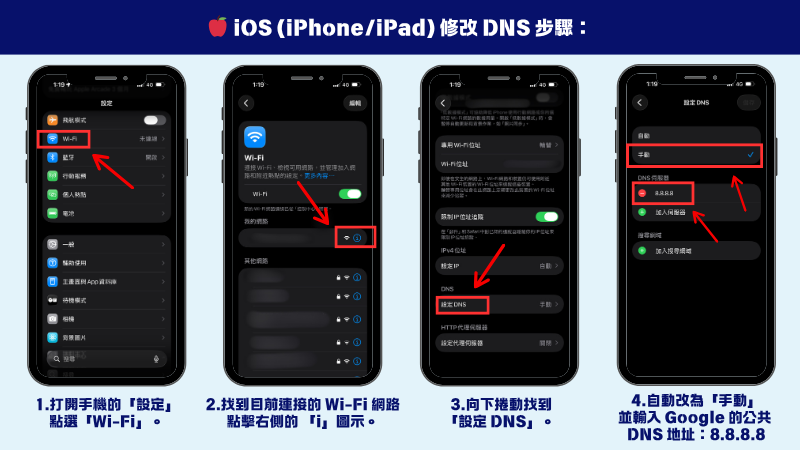
🍎 Steps to change DNS on iOS (iPhone/iPad):
- Open the phone’s “Settings”, then tap「Wi-Fi」。
- Find the currently connected Wi-Fi network, and tap the one on the right 「i” icon。
- Scroll down to “Settings DNS」。
- It will switch to “Manual” automatically, then tap“Add Server,” then enter Google public DNS Address:8.8.8.8, then save to browse Xiaohongshu normally.
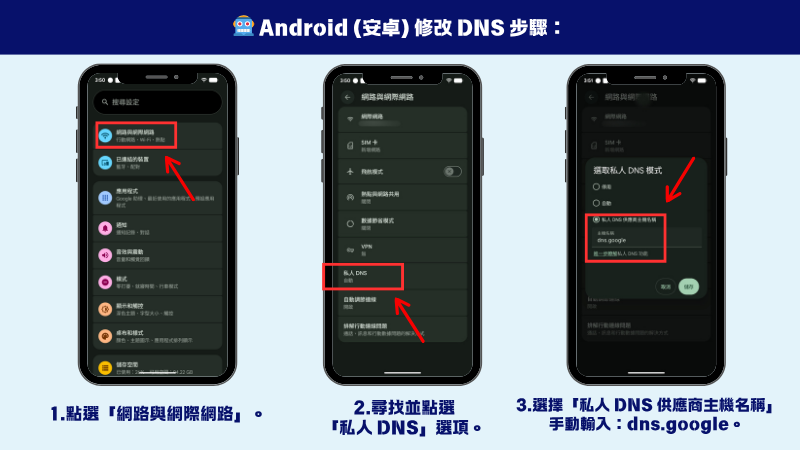
🤖Steps to change DNS on Android:
- Open your phone’s Settings and tap “Network & Internet” (or Connection settings).
- Find and select the “Private DNS” option.
- Select “Private DNS Provider Hostname” (Manual), enter dns.google, and tap Save to complete the workaround.
Method Two: Use a VPN service to bypass the restriction
If mobile data (4G/5G) makes it inconvenient to change DNS on the go, the quickest option is to download and open a VPN (virtual private network) app. Switch the endpoint to a country outside Taiwan, such as Japan, the United States, or Hong Kong, and continue using Xiaohongshu seamlessly.
Will I be penalized for using a VPN to download or browse Xiaohongshu?
Many people worry that, now that the government has issued a ban, using DNS or VPN to bypass the block and access Xiaohongshu could be illegal.
In fact, the current government position is “use is discouraged”, and no penalties have been established for ordinary people browsing and downloading.
Warning: Hidden cybersecurity and scam risks when using Xiaohongshu
Although bypassing Xiaohongshu restrictions is very easy, users should remain alert. Because Xiaohongshu in TaiwanNo legal agent or representative organization, which means:
- No help available: If you encounter online shopping fraud, personal information leaks, or consumer disputes on the platform, Taiwanese police face great difficulty investigating and requesting the platform’s cooperation in retrieving records.
- Information-security concerns: Users’ browsing data and personal information are stored on overseas servers and are not subject to the same strict protections under Taiwan’s privacy laws.
Summary
Although Xiaohongshu’s anti-fraud blocking order is well-intentioned, its practical effect is weakened by easy workarounds such as “changing DNS” and “using VPN to bypass the firewall.” If you still need Xiaohongshu, these two methods can restore your connection quickly. But stay alert to scams: avoid money transfers on the platform and unfamiliar links. That is the basic way to protect your interests.
🔍 Frequently asked questions (FAQ)
Q: Why can’t I access Xiaohongshu anymore?
A: Because Xiaohongshu has not appointed a legal representative in Taiwan, the Ministry of the Interior imposed network restrictions—“stopping DNS resolution and restricting access”—over anti-fraud concerns, making it unreadable on a regular connection.
Q: How can I get around the Xiaohongshu block on iPhone?
A: Open Wi-Fi settings, change the DNS setting to “Manual,” and add the server8.8.8.8to bypass the restriction.
Q: Is it illegal for people in Taiwan to use Xiaohongshu to bypass the block?
A: No. The government’s current measure only restricts internet access and does not impose penalties on ordinary people for downloading or browsing.