【Latest 2026】Pikmin Bloom redemption codes are here! Claim the free Earth Day code “PWEARTH26” for random rewards and coins. Codes cannot be entered in the app; sign in to the official online store with your linked account to redeem them. Each account can claim it once. If the gift does not appear, restart the game to sync it. This guide covers online-store redemption and common questions. Go for a walk, plant flowers, and collect your rewards!
Attention, Pikmin fans! As you walk to pluck Pikmin and plant flowers, don't miss the free rewards the official team sends out from time to time. 《Pikmin Bloom》 recently released new free reward codes. Enter the designated code in the official web store to claim the rewards.
This article has compiled the latest Pikmin Bloom redemption codes and includes a detailed “web store redemption guide” so you can claim your in-game items as quickly as possible!
2026 Latest Pikmin Bloom redemption codes (updated regularly)
The latest official code is the 2026 Earth Day code. Redeem it soon before it expires!
- 🎉 Latest Free Redemption Codes: PWEARTH26
- 🎁 Redemption rewards: Random in-game rewards / coins (as actually distributed by the official service)
- ⚠️ Notes: Each account can redeem the code once. We recommend entering it soon to avoid missing out.
How to redeem Pikmin Bloom codes? Web store redemption guide: 2 steps
New players may have trouble finding the in-game redemption entry. In fact, 《Pikmin Bloom》 codes are redeemed through the official online store.
Follow these 3 simple steps to redeem a code with ease:
Step One: Go to the official Pikmin Bloom web store
First, follow the link below to the official “Pikmin Bloom” web store and sign in with the account linked to your game.
👉 https://store.pikminbloom.com/zh-Hant/offer-redemption
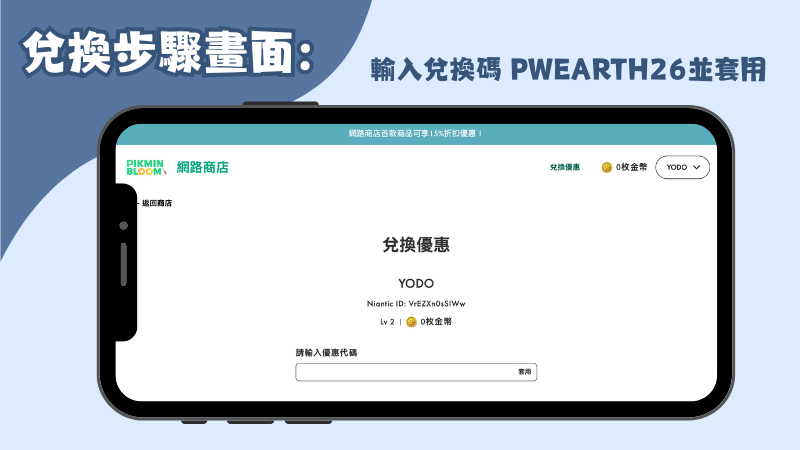
Step Two: Enter and apply the redemption code
Enter this code accurately in the “Enter coupon code” field that appears PWEARTH26, check that it is correct, then tap “Apply” on the right. If the top of the screen says “You received a reward through a redemption code,” the redemption was successful! Now just open “ on your phonePikmin Bloom》APP, and you will see the generous rewards credited to your account.
Conclusion: Claim the rewards and continue your Pikmin walking adventure!
For 《Pikmin Bloom》 2026, here is the full guide to claiming the latest Earth Day redemption code, “PWEARTH26.” Free in-game items are worth claiming, and the online redemption process is very simple, so do not miss this surprise prepared by the publisher!
If your friends play Pikmin too, share this article so everyone can collect all the rewards. Bookmark this page; if more Pikmin Bloom codes are released, we will keep updating it. Open the game, enjoy the nice weather, go for a walk, plant flowers, and keep expanding your Pikmin collection!
Frequently asked questions about Pikmin Bloom redemption codes (FAQ)
To help resolve issues that may come up during redemption, we have put together answers to some common questions:
Q1: Why does my code show “invalid” or “expired” after I enter it?
A: Codes usually have an expiration date or redemption limit. An invalid-code message may mean the promotion has ended. Check the latest article for current code information!
Q2: Can I enter a code directly in the game APP?
A: “Pikmin Bloom” codes can currently be redeemed only through the official Web Store and cannot be entered directly in the mobile APP. Please visit the web store in a browser.
Q3: I redeemed the code, but I do not see the reward in the game. What should I do?
A: After redemption, the system may need time to sync. We recommend closing 《Pikmin BloomFully close and restart the game app in the background; the reward will usually then be delivered to your account.